
How to Buy Bitcoin on Kraken Exchange: Beginner's Guide 2026
Updated: Aug 11
TABLE OF CONTENT
Buying your first Bitcoin can feel unclear at the start. New users may not know where to begin. They may also worry about fees, account checks, and payment options.
Kraken lets eligible users buy Bitcoin after account setup. Most users need to verify their identity first. They also need a supported payment method.
This guide explains how to buy Bitcoin on Kraken in simple steps. It is written for beginners who want a clear process. Bitcoin can rise or fall fast. So users should check all details before buying.
Kraken says users may buy as little as $3 worth of Bitcoin where available. In this post, we will look at account setup, payment methods, fees, buying steps, wallet safety, and common mistakes.
Key Highlights
Kraken lets eligible users buy Bitcoin after account setup and identity checks.
Beginners can buy BTC through the Kraken app, Kraken web, or Kraken Pro.
Users should review fees, payment method, price, and BTC amount before confirming.
Bitcoin can be bought in small fractions, so users do not need to buy 1 full BTC.
Learning how to buy Bitcoin on Kraken also means learning account safety and wallet risks.
What Is Bitcoin?

Bitcoin is the first major cryptocurrency. It is a digital asset that people can send and receive without using a normal bank for settlement. For a complete beginner explanation, read What is Bitcoin? A Beginner's Guide to the World of Cryptocurrency.
1) Simple Explanation for Beginners
Bitcoin runs on a public network. This network records transactions on a system called the blockchain. New readers can also learn the basics in What Is a Blockchain? The Easiest Explanation You’ll Ever Read.
A bank does not control Bitcoin. A company does not issue it. The network is run by many computers across the world.
Bitcoin is often written as BTC on crypto exchanges. When users buy Bitcoin on Kraken, they usually see the BTC ticker during the buying process.
2) Why Beginners Often Start With Bitcoin
Many new crypto users start with Bitcoin because it is widely known. It also has the longest market history in crypto.
Bitcoin is listed on most major crypto exchanges.
Bitcoin is often used as the main price benchmark for the crypto market.
Bitcoin can be bought in small fractions.
Users do not need to buy 1 full BTC.
Many beginners study Bitcoin before looking at other crypto assets.
Important Risk Note
Bitcoin is still a risky asset. Its price can move up or down in a short time. Beginners should also read What is a risk management and how to reduce risk of your crypto portfolio: A Beginner’s Guide before buying.
Buying Bitcoin does not guarantee profit. Beginners should understand this before learning how to buy Bitcoin on Kraken. They should also decide how much risk they can accept before making a purchase.
Read More:
What Is Kraken Exchange?
Kraken is a crypto exchange. Eligible users can use it to buy, sell, deposit, withdraw, and trade supported crypto assets. To understand exchange basics first, read What Is a Crypto Exchange and How Does It Work?
Kraken works as a platform between buyers and sellers. It gives users a place to trade Bitcoin and other supported crypto assets.
The platform can be used through its website, mobile app, and Kraken Pro. The basic Kraken app is made for simple buying and selling. Kraken Pro is made for users who want more trading tools.
Services may differ by country. A user’s account status can also affect which features are available.
Why Beginners Use Kraken:
Many beginners look at Kraken because it offers a clear way to buy Bitcoin. Users can create an account, verify their identity, and choose a supported payment method. For a wider setup guide, see How to Choose the Right Crypto Exchange and How to Do the Initial Set-Up: A Beginner’s Guide.
Users can buy Bitcoin through the Kraken app.
Users can also buy Bitcoin through Kraken web.
Users may deposit cash first and buy later.
Users can use Kraken Pro after learning the basics.
Users may withdraw Bitcoin to a personal wallet when ready.
Important Beginner Note:
Kraken is not the same for every user. Payment methods, fees, limits, and assets can change by region.
Before learning how to buy Bitcoin on Kraken, users should check their account status. They should also review fees before confirming any BTC purchase.
How Can Beginners Buy Bitcoin on Kraken?
Yes, beginners can buy Bitcoin on Kraken if they meet the platform’s basic rules. The process starts with account setup, identity checks, and a supported payment method.
1) Account Setup Comes First
New users cannot skip the basic setup process. Kraken needs users to create an account before they can buy Bitcoin.
See our guide first:
Key points:
Users need a secure email address.
The account must be activated by email.
Most users need identity verification.
A valid payment method is needed before buying.
Fees should be checked before order confirmation.
This process helps reduce basic errors. It also helps users understand how to buy Bitcoin on Kraken before placing the first order.
2) Buying Options for Beginners
Kraken gives users different ways to buy Bitcoin. The standard Kraken app is often the easiest choice for first-time users.
Key options:
Use the Kraken app for a simple buying flow.
Use Kraken web if a larger screen is preferred.
Use Kraken Pro after learning basic trading tools.
Start with a small amount if buying for the first time.
3) Location and Limits Matter
Kraken services are not the same in every country. Payment methods, fees, limits, and features may change by region.
A verified account does not always mean full access. Users should check their account status before buying. They should also review the final BTC amount before confirming the purchase.
4) A Supported Payment Method
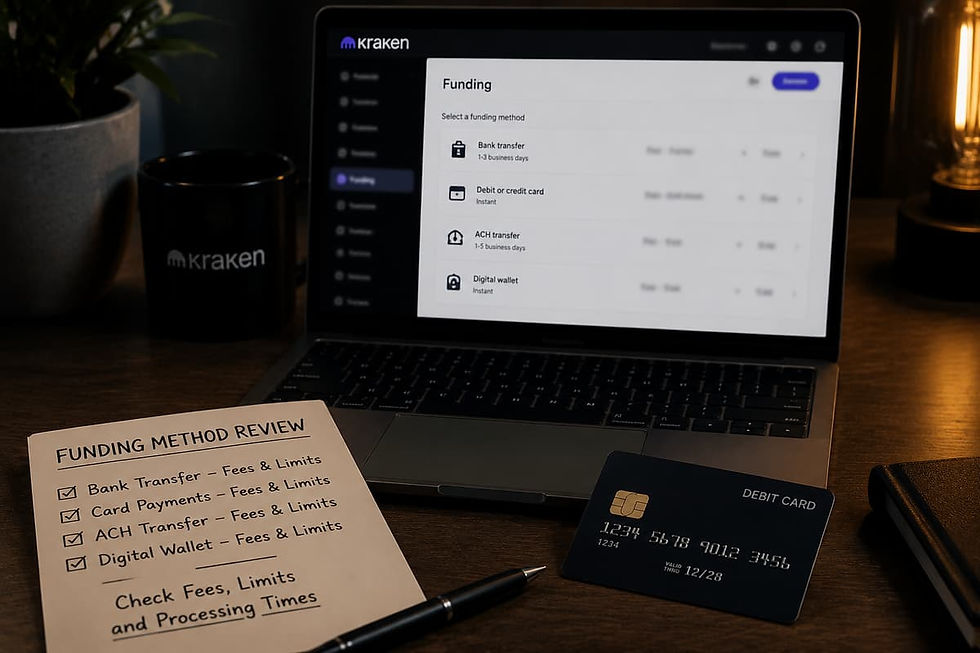
Users need a payment method before they buy BTC on Kraken. The available options can change by country.
Common options may include:
Bank transfer
ACH payment
Debit card
Credit card
Cash balance
Apple Pay or Google Pay
PayPal in selected regions
Crypto balance conversion
Not every method is available to every user. Fees and limits may also differ.
5) A Clear Buying Plan
Beginners should decide the amount before buying. They should avoid buying only because the price is moving fast. A helpful next step is How to Build Your First Crypto Portfolio: A Beginner's Guide.
A basic plan should answer three points:
How much money will be used?
Is this a one-time buy or a repeat buy?
Will the BTC stay on Kraken or move to a wallet?
Kraken allow to buy Bitcoin from min. 0.00005 BTC currently 3.08 USD.
This can help beginners learn how to buy Bitcoin on Kraken without placing a large first order.
Steps to Buy Bitcoin on Kraken Exchange
Step 1: Choose How You Want to Buy Bitcoin
Kraken gives users more than one buying option. Beginners may use the Kraken app or the Kraken web with simple user-friendly interface.
Kraken Pro is better for users who understand trading screens. First-time buyers may prefer the simple buying flow.
Step 2: Add Funds to Your Kraken Account

Choose currency you want to deposit: To purchase cryptocurrencies, you might opt to add funds to your account. Buying cryptocurrencies with deposited money typically incurs lower fees than purchasing directly with a credit card or other payment methods. The available cash currencies may vary depending on the region.

Choose payment method: Some users may see bank transfer options. Others may use debit card, credit card, ACH, digital wallet, or cash balance where supported. Fees and processing time should be checked first. The available payment methods can change by country. You can choose from 6 currencies.
Step 4: Buy Bitcoin
Example How to Buy Bitcoin Using Kraken Web
Kraken web also gives a simple buying option. Users can sign in and open the Buy Crypto section.
Choose Bitcoin and enter the cash amount:

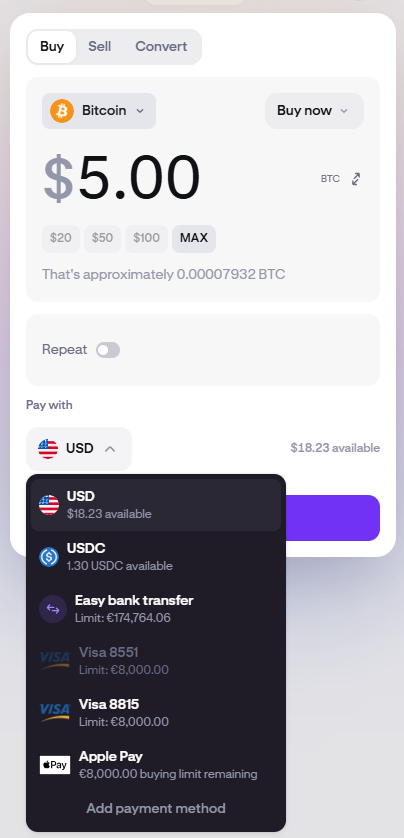
Choose the payment method: We chose to buy Bitcoin with USD balance as this is usually the cheapest option. Paying with a credit card may involve additional costs. Fees can change based on the payment method and trading option. Instant buying may not cost the same as trading through Kraken Pro.

Confirm the order:
Click on the Review button and check the details. When everything is correct, confirm the order.
Users should check the final screen before every purchase. The screen should show the BTC amount, cash amount, quoted price, fees, and total cost.
Example How to Buy Bitcoin Using Kraken Pro
Kraken Pro is made for advanced trading. It shows trading pairs, charts, order books, and order types.
Users can select a BTC pair, such as BTC/USD or BTC/EUR. Then they can place a market or limit order. Beginners should avoid margin and leverage!
Select trading option: In left side bar choose option "Trade" option. Afterwards you will see search icon in the left-top corner. By default it sould show BTC/USD. In not click on icon and search for Bitcoin.

Search for Bitcoin: Be careful to choose BTC/USD on spot market option.
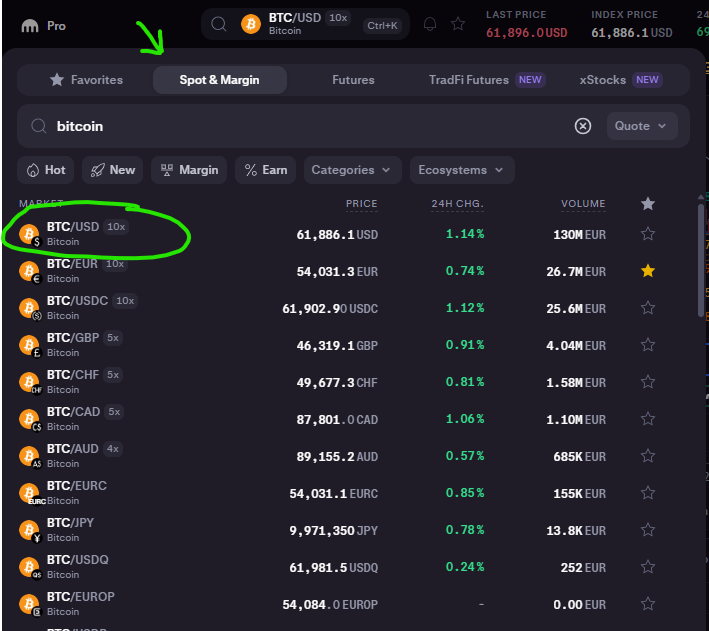

Filling the order form: Once you've selected BTC, an order form will appear. For beginners, we recommend keeping all default settings. Input the amount in USD that you want to use to buy Bitcoin; we chose $5. Click on "Buy BTC/USD".
Step 7: Check Your Bitcoin Balance
After the order is complete, check the BTC balance in the account. In left sidebar click on "Portfolio" and see the balance of BTC.
Step 8: Decide Whether to Keep or Withdraw BTC

After buying, users must decide where to keep the Bitcoin. Keeping BTC on Kraken may feel easier for beginners.
A personal wallet gives more control. It also adds more risk if the user loses the seed phrase. Anyone learning how to buy Bitcoin on Kraken should also learn wallet safety before making a withdrawal.
Wallet beginners should also read Crypto Wallets Explained: Hot Wallet vs Cold Wallet.
Should Beginners Use Market Buy, Limit Order, or Recurring Buy?
Bitcoin can be bought in different ways on Kraken. The right option depends on the user’s skill level, price comfort, and buying plan.

1) Market Buy
A market buy is the simplest option. It buys Bitcoin at the best available market price at that time.
This may suit beginners who want a fast purchase. It can be useful for small first-time buys. But the final price may change before the order is filled. This is more likely during sharp price moves.
A market buy is easy to use. But users should still check the quoted price and total cost before confirming.

2) Limit Order
A limit order gives more price control. The user chooses the highest price they are willing to pay for Bitcoin.
This can help users avoid buying above a set price. But the order may not fill if the market does not reach that price. So it may not suit users who want an instant purchase.
Limit orders are more common on Kraken Pro. Beginners can use them later after they understand trading pairs and order books.
3) Recurring Buy ( available on Kraken web and Kraken app )
A recurring buy lets users buy Bitcoin on a set schedule. This may be daily, weekly, biweekly, or monthly where supported.
This option may help users avoid emotional buying. It spreads the purchase over time instead of buying all at once.
Still, recurring buying does not remove risk. Bitcoin can fall after each purchase. Users should review the amount, schedule, and fees before using this option.
Beginner View:
For a first BTC purchase, many beginners may prefer a small market buy through the basic Kraken app or web. Users who want price control can learn limit orders later.
Recurring buy may suit users who consider Bitcoin as a long-term investment. But it should only be used after reviewing the risks. Anyone learning how to buy Bitcoin on Kraken should understand the order type before confirming a purchase.
Common Mistakes When Buying Bitcoin on Kraken
Buying Bitcoin is simple after account setup. Still, beginners can lose money or face delays if they ignore basic checks.
1) Buying Before Securing the Account
Some users rush to buy Bitcoin before setting up security. This is risky. A crypto exchange account should be secured before money is added.
Key safety checks
Use a unique password.
Turn on 2FA.
Secure the linked email.
Avoid public Wi-Fi.
Use only the official Kraken app or website.
Account safety should come before the first BTC purchase.
2) Ignoring Fees Before Confirming
Fees can change based on the payment method. Instant buy fees may differ from Kraken Pro trading fees.
Users should check the final screen before confirming.
The screen may show the BTC amount, price, fee, payment method, and total cost.
A small fee may look harmless. But repeated buys can increase total cost over time.
3) Using the Wrong Website or App
Fake crypto websites are common. Some fake apps also copy real exchange names.
Users should not sign in through random links. They should avoid links from email, Telegram, WhatsApp, Discord, or social media posts.
This step matters for anyone learning how to buy Bitcoin on Kraken. A fake page can steal login details within seconds. Virtual currency scams remain common.
4) Buying More Than You Understand
Bitcoin can move sharply in both directions. A beginner should not buy only because the price is rising.
It is safer to start with a small amount. Kraken says users may buy as little as $10 worth of Bitcoin where available.
A first purchase should be used to understand the process. It should not be treated as a guaranteed profit move.
5) Confusing Bitcoin With Other Assets
Bitcoin uses the ticker BTC. Users should check the asset name before confirming the order.
Some crypto names can look similar. Some tokens may also use Bitcoin-related names. Buying the wrong asset can lead to confusion and risk.
Check these details:
Asset name
BTC ticker
Cash amount
Final BTC amount
Payment method
6) Not Checking Payment Limits
Payment methods may have limits. They may also have extra fees or hold periods.
Bank transfers, cards, and digital wallets may not work the same way. The available options can also change by country.
Users should check limits before adding money. This helps avoid failed payments and delays.
7) Sending BTC to the Wrong Address
Withdrawing Bitcoin needs extra care. A wrong wallet address can lead to permanent loss. Before making transfers, read How to Send and Receive Digital Currency: A Comprehensive Guide to Cryptocurrency Transactions.
Users should copy the wallet address carefully. They should also check the first and last characters before sending.
A small test withdrawal can help beginners reduce risk. This is useful before moving a larger BTC amount.
8) Treating Bitcoin as Guaranteed Profit
Bitcoin is a volatile asset. Therefore, crypto risks need careful review. Its price can fall after a purchase.
A guide on how to buy Bitcoin on Kraken should not be read as investment advice. Users should review risk, fees, wallet safety, and personal budget before buying.
Kraken Bitcoin Buying Checklist
A short checklist can help beginners avoid mistakes before and after buying BTC. It also makes the buying process easier to review.
1) Account Checklist
Before buying Bitcoin, users should make sure the Kraken account is ready. A weak or incomplete account setup can delay the first purchase.
Key checks:
Kraken account is created.
Email activation is complete.
Identity verification is approved.
Correct country is selected.
Account limits are reviewed.
Payment methods are visible inside the account.
Users should not start payment through unknown links. The account should be accessed only through the official Kraken website or app.
2) Security Checklist
Account security should be checked before adding funds. This is important because crypto accounts are often targeted by scammers.
Key checks:
Strong Kraken password is used.
The password is not used anywhere else.
Two-factor authentication is enabled.
Email account has its own 2FA.
No password or 2FA code is shared.
Fake support messages are avoided.
Login is done only from a safe device.
A secure account gives users a safer base before they buy Bitcoin on Kraken.
3) Funding Checklist
Funding options can differ by country. Users should check the method, fee, and timing before adding money.
Key checks:
Payment method is supported.
Deposit fee is reviewed.
Minimum deposit amount is checked.
Processing time is understood.
Withdrawal holds are checked.
A small first deposit is considered.
Some payment methods may be fast. Others may take longer. Users should not assume that every deposit will be instant.
4) Purchase Checklist
The purchase screen should be reviewed with care. A rushed click can lead to the wrong amount or higher cost.
Key checks:
Bitcoin or BTC is selected.
Cash amount is correct.
Payment method is correct.
BTC amount is reviewed.
Quoted price is checked.
Fees are checked.
Total cost is clear.
Order is confirmed only after review.
Bitcoin prices can move fast. The final amount may change before confirmation.
5) After-Purchase Checklist
The process does not end after buying Bitcoin. Users should check the account balance and decide what to do next.
Key checks:
BTC balance is visible.
Purchase details are saved.
Fees are recorded.
Wallet plan is reviewed.
Tax records are considered.
Withdrawal risks are understood.
Beginners who learn how to buy Bitcoin on Kraken should also learn how to protect BTC after purchase. Buying is only one part of the process. Keeping it safe matters just as much.
Recommended Guides:
FAQs About Buying Bitcoin on Kraken
1) Can Beginners Buy Bitcoin on Kraken?
Yes, beginners can buy Bitcoin on Kraken if they are eligible. They need to create an account and complete identity checks first.
The buying process can be done through the Kraken app or Kraken web. More skilled users may also use Kraken Pro.
2) What Is the Minimum Bitcoin Purchase on Kraken?
Minimum purchase value for Bitcoin is 0.0005 BTC. See official table with minimums trade values here.
The minimum may depend on the user’s country and payment method. Users should check the final order screen before payment.
3) How Do I Buy Bitcoin on the Kraken App?
Users can open the Kraken app and choose the buy option. Then they can search for Bitcoin or BTC.
After that, they enter the amount and select a payment method. The final screen should show the quoted price, fees, and BTC amount.
4) How Do I Buy Bitcoin on Kraken Web?
Users can sign in to Kraken web and open the Buy Crypto option. Then they can select Bitcoin and enter the cash amount.
The payment method should be checked before confirmation. Users should also review the final BTC amount and total cost.
5) Can I Buy Bitcoin on Kraken With a Debit Card?
Kraken may support debit card purchases in selected regions. Availability can depend on the user’s country and account status.
Card payments may also include extra charges. These charges can come from Kraken or the card provider.
6) Can I Buy Bitcoin With a Credit Card on Kraken?
Credit card purchases may be available for some users. This depends on region, card support, and account rules.
Users should review fees before using a credit card. Some card issuers may treat crypto purchases as cash advance transactions
7) Can I Use Apple Pay or Google Pay on Kraken?
Digital wallet payments may be supported in some locations. This may include Apple Pay or Google Pay where available.
Users should check the payment options shown inside their Kraken account. If the option is not shown, it may not be available for that user.
8) Does Kraken Charge Fees to Buy Bitcoin?
Yes, fees can apply when users buy Bitcoin. The fee may depend on the payment method and buying option.
Instant buy fees may differ from Kraken Pro trading fees. Users should check the final order screen before confirming.
9) Is Kraken Pro Better for Buying Bitcoin?
Kraken Pro may suit users who understand trading pairs and order types. It gives more tools than the basic buying screen.
Beginners may find the standard Kraken app easier. It is often better for a simple first BTC purchase.
10) Can I Buy Less Than 1 Bitcoin on Kraken?
Yes, users do not need to buy 1 full Bitcoin. Bitcoin can be bought in small parts min. 0.00005 BTC
This is useful for beginners. It allows them to learn how to buy Bitcoin on Kraken without spending a large amount.
11) Can I Withdraw Bitcoin From Kraken to My Wallet?
Yes, users can withdraw Bitcoin to a personal wallet if their account allows it. They must use the correct wallet address.
A personal wallet gives users more control. But it also adds more risk. Lost seed phrases and wrong addresses can lead to permanent loss.
12) Should I Keep Bitcoin on Kraken or Move It to a Wallet?
Keeping Bitcoin on Kraken may be easier for beginners. The exchange holds the asset for the user.
A personal wallet gives more direct control. But the user must protect the seed phrase and wallet access. The right choice depends on skill level and risk comfort.
13) How Long Does It Take to Buy Bitcoin on Kraken?
The buying step can be fast after account setup. But payment method and account status can affect the process.
Bank transfers may take longer than card payments. Some deposits may also have hold periods before withdrawal.
14) Why Did My Bitcoin Purchase Fail?
Final Thoughts!
Buying your first Bitcoin on Kraken can be simple when the account is ready. The process should start with account setup, identity checks, and strong security.
Beginners should not rush the first purchase. They should review the payment method, BTC amount, quoted price, fees, and final cost before confirming.
The Kraken app and Kraken web may be easier for first-time buyers. Kraken Pro may suit users who understand trading pairs, market orders, and limit orders.
After buying Bitcoin, users should check their BTC balance. They should also decide where to keep it. Keeping BTC on Kraken may feel easier. A personal wallet gives more control, but it also adds more responsibility.
Bitcoin can move sharply in price. A first purchase should not be treated as a sure profit move. Users should start with an amount they understand and can afford to risk.
For more clear crypto guides and exchange tutorials, make BitCoinBlog part of your reading list. BitCoinBlog helps readers understand Bitcoin, fees, wallets, and platform safety before they take the next step.
Ready to Explore Kraken?
Kraken is designed for secure and beginner-friendly crypto trading.

JAN MATULA
Founder of Bitcion.Blog
Graduate of Bratislava University of Economics and Business, experienced Forex and Stocks trader since 2008, early Bitcoin investor and crypto trader since 2021.
This content is for informational purposes only and should not be taken as solicitation, recommendation, endorsement or investment advice. It is crucial for you to conduct your own research and due diligence to make informed decisions, as any investment will be your sole responsibility. Please review our disclaimer and risk warning.


