
How to Create and Verify a Crypto Account on Kraken Exchange? Step-by-Step Guide 2026
Updated: Aug 11
TABLE OF CONTENT
Creating a Kraken account is the first step for new crypto users. Kraken may ask for identity checks before users can use key account features. This is standard for many regulated crypto exchanges. If you are new to exchange platforms, first understand how crypto exchanges work. It helps the platform check the user’s name, age, country, and documents.
This guide explains how to create and verify a Kraken account in simple steps. It also helps to know how to choose the right crypto exchange before signing up. It is written for beginners who want a clear account setup process. Users should prepare a secure email, a strong password, and a valid ID before starting.
Kraken account verification may differ by country. Some users may also need proof of address. Access to services may depend on location and account status. In this post, we will look at sign-up, email activation, Kraken KYC, document upload, account security, and common verification issues.
Key Highlights
Kraken users must create an account before using key crypto services.
Identity verification is required for many account features.
Users should keep a valid ID ready before starting Kraken KYC.
Account approval may depend on age, country, and document quality.
Learning how to create and verify a Kraken account can help reduce setup delays.
What Is Kraken Exchange?

Kraken Official Website is a global crypto exchange that lets users buy, sell, and trade digital assets securely. It lets users buy, sell, deposit, withdraw, and trade crypto. The platform has been active since 2011. Kraken says it now supports crypto, stocks, futures, staking, and other services in selected regions.
The services may not be the same for every user. Location matters. Account status also matters. A beginner may need to complete identity checks before using key features. This is why many users first search for how to create and verify a Kraken account.
Why Beginners Use Kraken Crypto Exchange
New users often use Kraken Exchange to open a crypto account. They may want to buy Bitcoin or other supported assets. Some users also use it to deposit cash or move crypto from another wallet. Kraken also provides educational resources for beginners through its official learning hub.
Kraken also has Kraken Pro. This is made for users who want more trading tools. Beginners can start with the basic Kraken app or website first and learn crypto fundamentals through educational resources. They can move to Kraken Pro later if needed. Kraken Pro may be more useful once users understand crypto trading basics.
Important Beginner Note:
A verified Kraken account can unlock key account features. Kraken says verified users can buy and sell crypto. They may also deposit cash and crypto. Some features, like margin trading, depend on location and rules. Leverage products need extra care and experience.
Who Can Create a Crypto Account on Kraken Exchange?

Kraken accounts are not open to every user by default. The platform checks age, location, and identity details before it gives access to key account features.
1) Basic Eligibility Requirements
Kraken is not open to every person in every country. Users must meet basic rules before they can open an account. Kraken says users must be at least 18 years old. They must also live in a supported area.
A user must provide correct personal details during sign-up. This may include name, date of birth, address, and country of residence. The details must match the identity document used later for Kraken account verification.
Kraken may also ask users to complete KYC before they can use key services. KYC means “Know Your Customer.” It is a standard identity check used by many crypto exchanges. New users can also review common crypto terms before using an exchange.
2) Location Matters
Kraken services can change by country. Some users may get access to more features. Others may face limits due to local rules. This can affect crypto buying, deposits, withdrawals, and trading options.
A verified account does not mean every service will be available. The account features may depend on the user’s country and account level.
3) Personal and Business Accounts
Most beginners need a personal account. This is for people who want to use Kraken as individual users.
A business account is different. It is made for companies and legal entities. It may need more documents. It is not required for users who only want to learn how to create and verify a Kraken account for personal use.
What You Need Before Signing Up

Before starting the Kraken sign-up process, users should keep basic details ready. This can help avoid errors during Kraken account verification.
1) Secure Email Address
Use an email address that you control. Do not use a shared email or an old email with weak security.
The email account should have its own strong password. It should also have two-factor authentication turned on. Kraken warns that email access is very important. A hacked email can be used to reset passwords or approve account actions.
2) Strong Password
Create a password that is only used for Kraken. Do not reuse a password from your email, bank, or another crypto exchange.
A good password should be hard to guess. It should not include your name, phone number, birthday, or common words. A password manager can help create and store it safely.
3) Phone Number
Kraken may ask for a mobile number during account setup. This can depend on your country and account type.
Use a number that you can access at any time. Do not use a temporary number. It may create problems during future account checks.
4) Identity Document
Most users need a valid government ID for Kraken KYC. This may include a passport, driving license, or national ID.
The document should show your full legal name. It should also show your photo and date of birth. The ID should not be expired.
5) Proof of Address
Some users may need proof of address. This can depend on the country and the verification level.
The address should match the details entered on Kraken. If the details do not match, the review may take longer.
6) Clear Camera or Scanner
Users should upload clear document images. Blurry photos are one common reason for delays.
Use good lighting. Keep all document corners visible. Do not crop the image. Do not cover any text on the document.
These basic steps make it easier to understand how to create and verify a Kraken account without delays.
Steps to Create and Verify a Kraken Account
Creating a Kraken account is a simple process when users prepare the right details first. The steps below show how to create and verify a Kraken account without making common beginner mistakes.
Step 1: Use the Official Kraken Website or App
Start from the official Kraken website or mobile app. Do not use links from unknown emails, ads, or social media posts. This is important because fake crypto links are a common scam method.
Fake crypto sites can copy the real design. Always check the website name and app publisher before entering details.
Step 2: Create Your Kraken Account
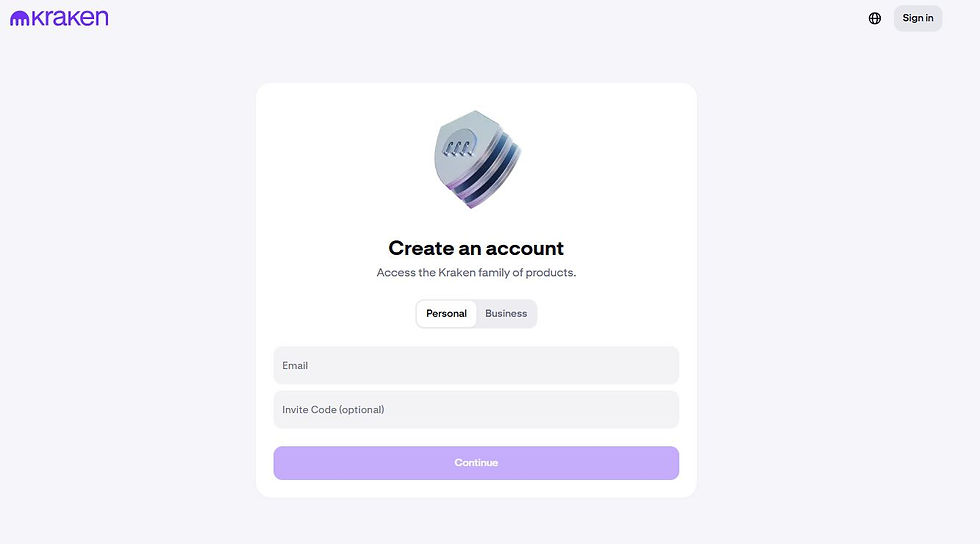
Enter your email address. Then create a strong password.

Use an email you control. Do not use the same password that you use for email, banking, or other crypto accounts.
Step 3: Activate Your Account by Email

Kraken will send an activation email after sign-up. Open the email and complete the activation step.
Check the spam folder if the email does not arrive. Also make sure the email address was typed correctly.
Step 4: Start Kraken Identity Verification
After login, begin the Kraken account verification process. This is also called Kraken KYC.
Kraken uses this step to check the user’s identity. It may also decide which account features are available.
Step 5: Enter Your Personal Details
Enter your legal name as it appears on your official documents and the address where you live and can provide proof.
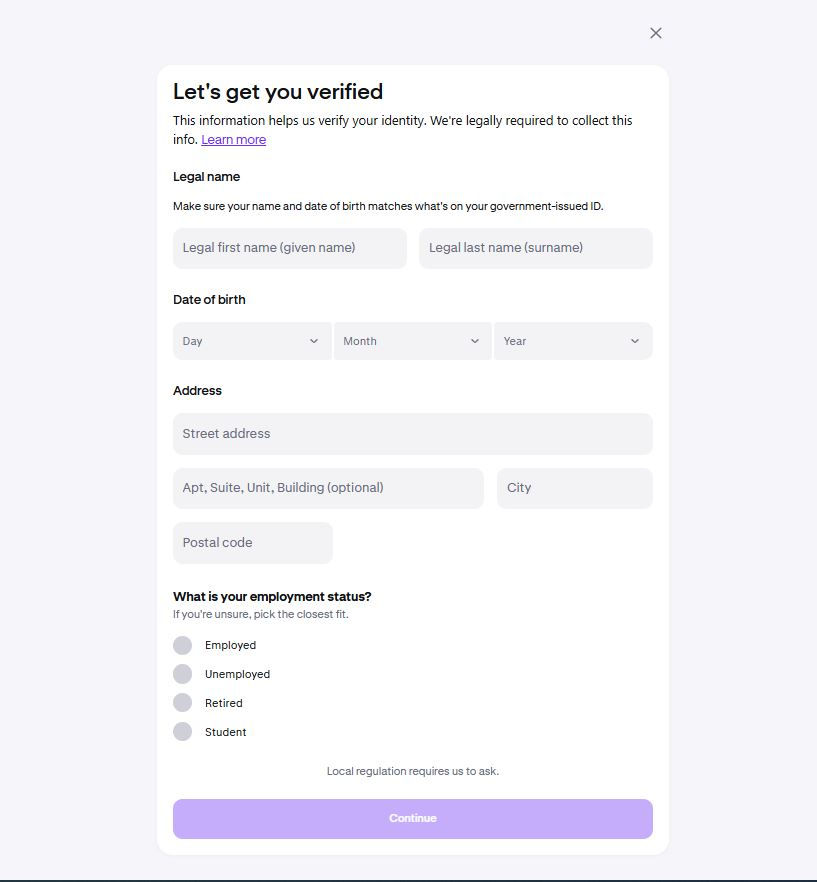
Step 6: Upload Verification Documents

Upload a valid identity document. This may be a passport, driving licence, or national ID.
The photo should be clear. All corners of the document should be visible. The ID should not be expired.
Step 7: Wait for Verification Review
Kraken may review details through automatic or manual checks. The time can vary by country and document quality.
Do not submit the same request again unless Kraken asks for it. Repeated uploads may slow the process.
Step 8: Secure Your Kraken Account
Turn on two-factor authentication after account setup for stronger protection against unauthorized access. This adds another security step during login. For more safety basics, review crypto security practices.
Also secure your email account. A weak email account can put your Kraken account at risk. This is why wallet and exchange security should be planned before storing crypto.
Step 9: Check Verification Level and Limits
After approval, check your account status. Your limits may affect deposits, withdrawals, and some trading features.
Higher limits may need more checks. Beginners should apply for them only if needed.
Step 10: Add Funds After Verification
Once the account is verified and secured, users can review funding options. These options may differ by country.
Start with a small test deposit if you are new. Beginners should also learn how to buy crypto safely before making larger deposits. For crypto transfers, always check the asset and network before sending funds.
Learn More Before Buying Crypto:
Kraken App vs Kraken Pro: Which Should Beginners Use?
Kraken gives users two main ways to use the platform. Beginners should understand the difference before they create and verify a Kraken account.
1) Kraken App
The Kraken app is built for basic account use. It is usually easier for new users who want a simple start.
Simple Account Setup:
The Kraken app can be useful during sign-up. Users can enter their details and start verification from a phone.
Easy Buying and Selling:
The app is made for simple crypto actions. Users can check prices and place basic buy or sell orders.
Better for First-Time Users:
New users may find the app easier than Kraken Pro. It shows fewer trading tools and keeps the process simple.
2) Kraken Pro
Kraken Pro is made for users with more trading experience. It gives more tools than the basic Kraken app.
Advanced Trading Screen:
Kraken Pro shows charts, order books, and market data. These tools can help active traders.
More Order Types:
Users may get access to limit orders and other trading options. These tools need more care and knowledge.
Not Needed for Basic Setup:
A beginner does not need Kraken Pro to learn how to create and verify a Kraken account. The standard Kraken app or website is enough for account setup.
Beginner Recommendation:
New users can start with the standard Kraken app or website. This is better for sign-up, verification, and basic account use.
Kraken Pro can be used later. It may suit users who want more control over trades and order types.
Common Kraken Verification Problems and Fixes
Kraken verification can be delayed if user details or documents do not match. Most issues can be avoided with clear photos, correct data, and careful account setup.
1) Activation Email Not Received
Some users may not receive the activation email right away. This can happen if the email goes to spam or if the wrong email was entered.
Check the spam and junk folders first. Then search the inbox for Kraken. If there is still no email, review the email address used during sign-up.
2) Blurry ID Photo
A blurry ID photo can delay Kraken account verification. The review team must be able to read all details clearly.
Take the photo again in good lighting. Place the document on a flat surface. Make sure the name, date of birth, and document number are easy to read.
3) Cropped Document Edges
A document may be rejected if the corners are missing. Kraken may need to see the full ID during verification.
Keep all four corners visible in the photo. Do not crop the image too closely. Avoid covering any part of the document with fingers.
4) Expired Identity Document
An expired ID can cause a failed review. Crypto exchanges usually need a valid government document for KYC checks. They operate within a broader blockchain ecosystem of digital assets and trading networks.
Use a current passport, driving licence, or national ID. Check the expiry date before uploading the file.
5) Name Does Not Match
The name on the account should match the name on the ID. Short names and nicknames can create issues.
Use your full legal name during sign-up. Do not use a business name for a personal account. Do not use a different spelling from your ID.
6) Address Details Do Not Match
Some users may need to submit proof of address. The address should match the details entered in the Kraken account.
Use the same address format where possible. If your proof of address shows a different address, the review may take longer.
7) Wrong File Format or Large File Size
Document upload can fail due to file issues. This may happen when the file is too large or not accepted.
Use a clear JPG, PNG, or PDF file. Avoid password-protected files. Check the file before uploading it.
8) Verification Takes Longer Than Expected
Kraken account verification may not be instant for every user. Review time can change by country, document quality, and account type.
Check your email for any message from Kraken. Do not submit the same documents again unless asked. Duplicate requests may slow the process.
9) Region-Based Limits
Some features may not be available in every country. A verified account does not mean every service will open.
Check which services are allowed in your region. This can affect deposits, withdrawals, staking, margin, and some crypto assets.
10) Duplicate Account Issue
Creating more than one account can create problems. It may also delay review.
Use one account only. If there is an issue, contact official Kraken support instead of opening another account.
Kraken Account Security Tips for Beginners

Security is one of the most important parts of Kraken account setup. Users should secure the account before adding funds or starting any crypto trade.
1) Use a Unique Password
Use a password that is only for Kraken. Do not reuse a password from email, banking, or another crypto app.
A strong password should be long and hard to guess. It should not include your name or birth date. A password manager can help store it safely.
2) Enable Sign-In 2FA
Two-factor authentication adds an additional security layer during login. It helps protect the account even if the password is exposed.
Kraken users can enable sign-in 2FA from account security settings. An authenticator app is often safer than SMS. SMS codes can be at risk if a phone number is stolen.
3) Secure Your Email Account
Your email account is linked to your Kraken account. If the email is weak, the Kraken account may also be at risk.
Use a strong email password. Turn on email 2FA. Review recovery options and remove old devices that you do not use.
4) Use Passkeys Where Available
Passkeys can offer stronger login safety. They are built to reduce phishing risk.
A passkey can be linked to a device or security key. This can make it harder for fake websites to steal login details.
5) Watch for Phishing Emails
Phishing is a common risk in crypto. Scammers may send fake emails that look like exchange alerts.
Do not click unknown links. Do not share passwords, 2FA codes, or account details. Always check the sender before taking action.
6) Use Only Official Support Channels
Fake support accounts are common on social media. They may ask users to share private details.
Kraken support will not ask for your password or 2FA code. Users should avoid help offers from Telegram, WhatsApp, Discord, or random X accounts.
7) Protect Funding Actions
Crypto transfers are hard to reverse. A wrong wallet address or wrong network can cause loss of funds.
Check the asset before sending funds. Check the network twice. Beginners should start with a small test transfer.
8) Keep Devices Updated
Use a safe phone or computer for account access. Do not log in from public computers.
Keep the browser, app, and operating system updated. Avoid public Wi-Fi when signing in to crypto accounts.
Learning how to create and verify a Kraken account is only the first step. A secure account helps reduce risk before users deposit funds or place trades.
Beginner Checklist Before Using Kraken
A quick checklist can help users avoid basic account mistakes. It is useful before adding funds or starting any crypto trade.
1) Account Setup Checklist
Use the correct email address during sign-up. This email should be active and secure.
Create a strong password for Kraken only. Do not reuse the same password from another site.
Check the selected country before moving ahead. The country can affect account features and Kraken account verification.
Make sure the account activation email is completed. Without email activation, the setup may not move forward.
2) Verification Checklist
Use your full legal name during verification. The name should match your identity document.
Enter the correct date of birth and address. Wrong details can delay the review.
Upload a valid ID. It should not be expired.
Take a clear photo of the document. All corners should be visible. The text should be easy to read.
Do not send the same verification request again unless Kraken asks for it. Repeated submissions can slow the review.
3) Security Checklist
Turn on two-factor authentication after signing in. This adds another safety step to the account.
Secure your email account too. Use a strong email password and email 2FA.
Do not share passwords or 2FA codes with anyone. Real support teams will not ask for these details.
Use only the official Kraken website or app. Fake sites can steal login details.
4) Funding Checklist

Check your verification level before depositing funds. Limits may depend on account status and country.
Review fees before using any funding method. Costs can change based on the payment method and currency.
Start with a small test deposit if you are new. This helps confirm that the process works.
For crypto deposits, check the asset and network twice. A wrong network can lead to loss of funds.
This checklist helps users understand how to create and verify a Kraken account in a safer way. Account setup should be done carefully before any money is added.
Read More Beginner Guides:
FAQs About Creating and Verifying a Kraken Account
Final Thoughts!
Creating and verifying a Kraken account is not hard. But users should not rush the process. A small mistake in email, name, address, or document upload can delay approval.
Kraken asks users to complete identity checks before many key features become available. This may include buying crypto, adding cash, making withdrawals, or using higher limits. These rules can change by country and account type.
Beginners should start with the official Kraken website or app. They should use a secure email and a strong password. They should also keep a valid ID ready before starting Kraken KYC.
Account security is just as important as verification. Users should enable 2FA before adding funds. They should also protect their email account and avoid fake support messages.
For more crypto guides, exchange tutorials, and market explainers, visit BitCoinBlog regularly. BitCoinBlog gives readers clear information before they open accounts, review platforms, or use crypto services.
Ready to Start Your Crypto Journey?
Creating and verifying your Kraken account is the first step toward using crypto safely and effectively.

JAN MATULA
Founder of Bitcion.Blog
Graduate of Bratislava University of Economics and Business, experienced Forex and Stocks trader since 2008, early Bitcoin investor and crypto trader since 2021.
This content is for informational purposes only and should not be taken as solicitation, recommendation, endorsement or investment advice. It is crucial for you to conduct your own research and due diligence to make informed decisions, as any investment will be your sole responsibility. Please review our disclaimer and risk warning.


