How to Use Stop Loss and Take Profit on Kraken: Cryptocurrency Trading Beginner's Guide 2026
Updated: Aug 11
TABLE OF CONTENT
Buying crypto is only the first step, and understanding cryptocurrency fundamentals is equally important before trading. Traders also need to know when to exit. This is where stop loss and take profit orders can help. For a broader trading foundation, readers can also go through How to trade Bitcoin and Cryptocurrencies.
A stop loss order can help reduce loss when the market moves against a trade. A take profit order can help lock gains when the price reaches a set target. Kraken also offers more order tools through Kraken Pro. These include stop loss limit, take profit limit, trailing stop, and bracket orders.
This guide explains how to use stop loss and take profit on Kraken in simple terms. It also covers basic risks, order types, app use, Kraken Pro use, and common mistakes.
Key Highlights
Stop loss orders help traders set a planned exit when the market moves against them.
Take profit orders help traders close a trade when the price reaches a target.
Kraken users can use basic TP/SL tools on the Kraken app after a purchase.
Kraken Pro offers more order control through bracket orders, limit orders, and trailing stops.
Learning how to use stop loss and take profit on Kraken can reduce emotional trading, but it does not remove market risk.
What Is a Stop Loss Order in Crypto?

A stop loss order is used to control risk in crypto trading. It can help traders exit when the market moves against their position.
This connects closely with What is a risk management and how to reduce risk of your crypto portfolio: A Beginner’s Guide. Go through it!
A stop loss order is an order that triggers at a set price. This price is called the stop price.
For example, a trader may buy Bitcoin and set a stop loss below the buy price. If Bitcoin falls to that level, the stop loss order can trigger.
On Kraken, a stop loss order can be used to buy or sell once the price reaches the selected stop price. Many traders use it to reduce loss. Some traders also use it to protect gains after a price rise.
This is one of the first tools beginners should understand when learning crypto risk management fundamentals for beginners.
Beginner Example:

Suppose a trader buys Bitcoin at $60,000. The trader does not want to risk more than 5% on the trade.
In that case, the trader may place a stop loss near $57,000. If Bitcoin drops to that level, the stop loss can trigger.
This helps the trader avoid holding the trade without a clear exit plan.
Important Risk Note:
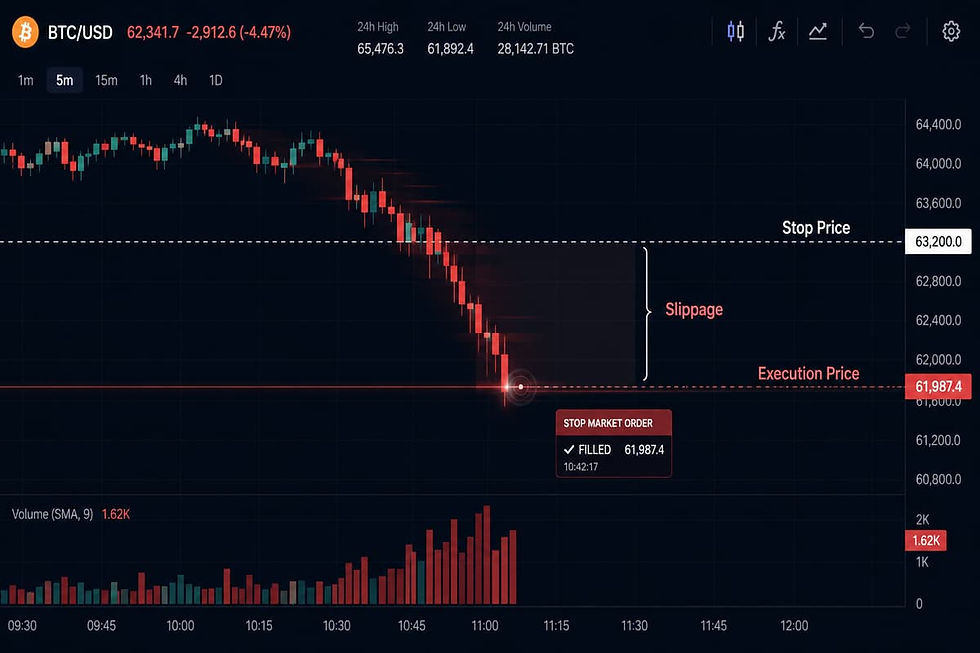
A stop loss does not guarantee the exact exit price, because stop-loss order execution risks can appear during fast or volatile markets. This is important.
If the market moves fast, the final trade price may be different from the stop price. This can happen during sharp price moves or low trading volume.
So, a stop loss is useful. But it is not perfect protection.
Beginner Takeaway:
A stop loss helps define risk before the trade gets worse. It is a risk tool, not a profit guarantee.
What Is a Take Profit Order in Crypto?

A take profit order helps traders plan an exit at a higher price using a take profit trading strategy that locks in gains automatically. It is used when a trader wants to close a trade after the price reaches a set target.
A take profit order is an order that triggers when the price reaches a selected profit level. The goal is to lock gains before the market turns back.
For example, a trader may buy Bitcoin at one price and set a higher target. If Bitcoin reaches that target, the take profit order can trigger.
This helps traders avoid emotional choices. Many beginners wait too long because they want more profit. Then the price may reverse. A take profit order can reduce that mistake.
This is why it is important to learn how to use stop loss and take profit on Kraken before placing larger trades.
Beginner Example:
Suppose a trader buys Bitcoin at $60,000. The trader wants to exit if Bitcoin reaches $66,000.
In this case, the trader can set a take profit order near $66,000. If the price reaches that level, the order can trigger.
This gives the trader a clear exit plan. It also reduces the need to watch the chart all day.
Why Take Profit Matters:
Crypto prices can move fast. A strong move can turn into a sharp pullback within minutes or hours.
A take profit order helps traders act based on a plan. It can stop greed from taking over during a price rally.
Beginner Takeaway:
A take profit order is used to plan an upside exit. A stop loss order is used to plan a downside exit. Both tools help traders manage risk with more discipline.
Kraken Cryptocurrency Trading Rules: Why Stop Loss and Take Profit Is Important
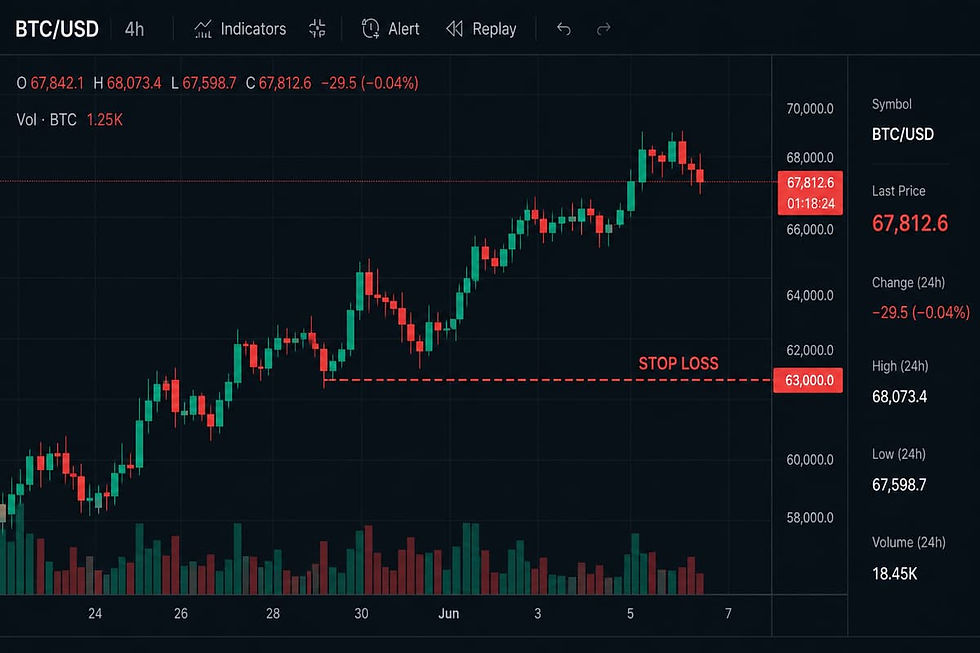
Cryptocurrency trading is not only about buying at the right price, but also about understanding crypto market volatility risks before entering any position. It is also about knowing when to exit. This is why stop loss and take profit orders matter.
1) Crypto Prices Can Move Quickly
Crypto markets can move fast. Readers who want to understand why prices move sharply can explore How Crypto Liquidity Impacts Price Volatility. A coin can rise or fall within minutes. News, Bitcoin price action, low volume, and market fear can all affect price. For market context, beginners can also read Bitcoin Price Analysis for Beginners.
Beginners often enter a trade without a clear exit plan. This can lead to panic when prices fall. It can also lead to greed when prices rise.
A stop loss helps control the downside. A take profit order helps plan the upside. Both tools can help traders act with more care.
2) Risk Management Starts Before the Trade
A trader should not plan risk after buying crypto. The plan should be ready before the trade is placed. That is why beginners should also understand How to Build Your First Crypto Portfolio: A Beginner's Guide before placing larger trades.
Before entering a trade, a beginner should know the entry price. They should also know the loss they can accept. The profit target should also be clear. This idea is also part of Step-by-Step Guide to Creating a Rule-Based Crypto Trading Strategy.
This does not make the trade safe. But it gives the trader a clear structure. That structure is important in a fast market.
This is a key part of learning how to use stop loss and take profit on Kraken.
3) These Orders Help Reduce Emotional Trading
Many trading mistakes come from emotion. A trader may hold a losing trade too long. Another trader may exit a winning trade too early.
Stop loss and take profit orders can reduce these mistakes. They help traders follow a plan instead of reacting to every price move.
This is useful for beginners. Mobile trading can make quick decisions too easy. One tap can open or close a trade.
4) They Are Not Perfect
Stop loss and take profit orders are useful. But they do not guarantee profit or full protection.
A stop loss market order may fill at a different price. A stop loss limit order may not fill if the price falls too fast.
So, these tools should be used with care. They work best with small position size, clear risk limits, and a proper trading plan.
Stop Loss vs Take Profit: Key Difference

Stop loss and take profit orders serve different goals. Both help traders plan an exit before price moves too far. New traders may find these terms easier after reading Most Essential Crypto Expressions All Beginners Must Know.
Feature | Stop Loss | Take Profit |
Main purpose | Helps limit loss | Helps lock gains |
Usual placement | Below entry for long trades | Above entry for long trades |
Trigger point | Price moves against the trade | Price reaches the target |
Beginner use | Protects trading capital | Plans profit exit |
Main risk | Slippage or no fill | Price may reverse before target |
Simple Long Position Example:
Suppose a trader buys Bitcoin at $60,000. The trader may set a stop loss at $57,000. This means the trade may exit if Bitcoin falls near that level.
The same trader may set a take profit at $66,000. This means the trade may exit if Bitcoin reaches the planned target.
In this case, the stop loss is used for downside risk. The take profit is used for upside planning.
Why the Difference Matters:
Many beginners only think about profit before entering a trade. This is a common mistake. A trade should also have a loss plan.
Learning how to use stop loss and take profit on Kraken helps traders set both sides of the trade. It gives a clearer plan before the market starts moving.
Short Position Note:
For short trades, the logic is opposite. A stop loss may be placed above the entry price. A take profit may be placed below the entry price.
Beginners should be careful with short trades. Shorting often involves margin or leverage, so traders should understand crypto liquidation and leverage risk before using advanced positions. These tools can increase losses fast.
What Order Types Does Kraken Support?
Kraken cryptocurrency trading supports several order types for crypto traders, including advanced crypto order execution tools for different trading strategies. Some are simple. Others are better suited for users who already understand price charts and trade tools.
The most basic order types are market and limit orders. A market order is used when the trader wants the order to fill quickly. A limit order is used when the trader wants to set a chosen price.
For risk planning, Kraken also supports stop loss and take profit orders. These are the main tools covered in this guide.
A stop loss order helps a trader exit when the price moves against the trade. A take profit order helps a trader exit when the price reaches a planned target.
Kraken also supports stop loss limit and take profit limit orders. These give more price control. But they also need more care. The order may not fill if the market moves too fast.
Advanced Order Types on Kraken
Kraken Pro also offers more advanced tools. These may include trailing stop, trailing stop limit, and bracket-style orders.
A trailing stop can move with the market when the trade is in profit. It can then trigger if the price moves back by a set amount.
A bracket order can include both a stop loss and a take profit. This helps traders plan both exits before the trade is placed.
These tools can be useful. But they can also confuse beginners. A wrong setting can lead to a poor trade. Human beings did invent “advanced settings” and then acted shocked when people misused them.
Beginner Recommendation:
Beginners should first learn market, limit, stop loss, and take profit orders. These are enough for basic risk planning.
After that, they can study stop loss limit, take profit limit, trailing stop, and bracket orders. This is the safer path when learning how to use stop loss and take profit on Kraken.
Advanced order types should not be used just because they look professional. They should be used only when the trader understands how the order works.
Read More:
Kraken App vs Kraken Pro: Where Can You Use Stop Loss and Take Profit?
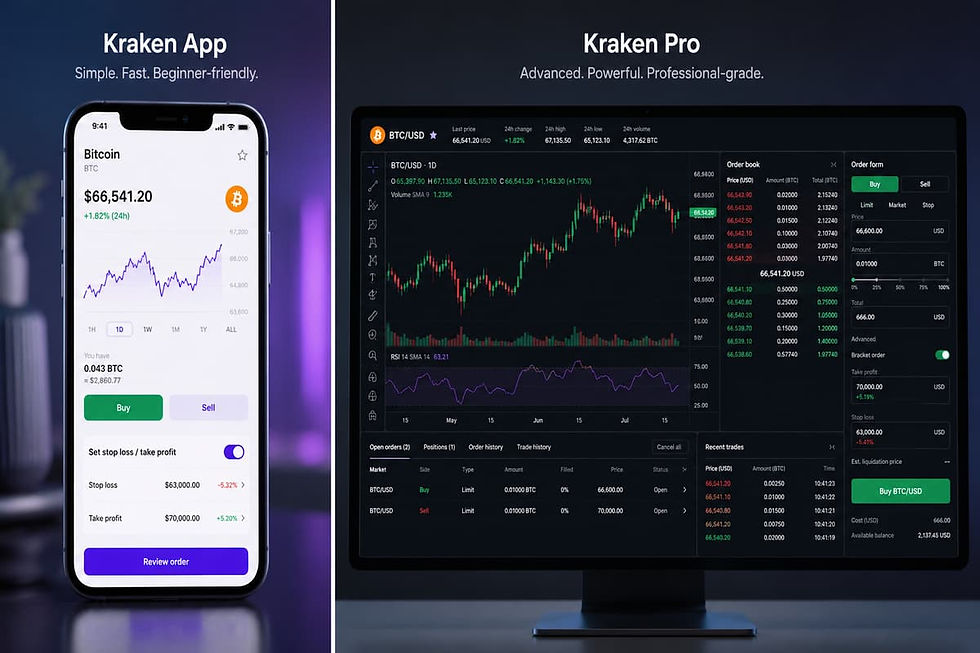
Kraken offers stop loss and take profit tools across different platforms. The right place depends on how much control the trader needs.
1) Kraken App
The Kraken app is better for simple use. It can help users set take-profit and stop-loss orders linked to a previous crypto buy.
This means a beginner can first buy crypto through the app. After that, they may be able to set an exit plan for that purchase.
A take-profit order is used when the trader wants to sell at a higher price. A stop-loss order is used when the trader wants to sell at a lower price to reduce possible loss.
This option is useful for beginners. It keeps the process more direct. It also avoids the full trading screen seen on Kraken Pro.
2) Kraken Web
Kraken Web may also support custom orders. These orders can include take profit and stop loss settings linked to a previous purchase.
This can be useful for users who prefer a desktop screen. A larger screen can make it easier to review order details.
Still, users should not rush. They should check the asset, price, order size, and fee before confirming.
3) Kraken Pro
Kraken Pro gives more control over stop loss and take profit orders. It is better for users who understand trading pairs and order types.
On Kraken Pro, users can use bracket orders. These can include a take profit level and a stop loss level with the main order.
This is useful for traders who want to plan both sides of a trade. If one exit order triggers, the other may be cancelled. This is known as One Cancels the Other.
Simple Platform Guide:
Platform | Best For |
Kraken App | Simple stop loss and take profit after buying |
Kraken Web | Desktop custom orders |
Kraken Pro | Bracket orders and more trade control |
Kraken Pro App | Advanced mobile trading |
Beginner View:
Beginners should start with the Kraken app if they want a simple setup. Kraken Pro can be useful later.
Anyone learning how to use stop loss and take profit on Kraken should first understand the basic order flow. Advanced tools should come after that.
How Stop Loss Orders Work on Kraken
A stop loss order on Kraken starts with a stop price. This is the price that tells Kraken when the order should trigger.
1) Stop Price
The stop price is the level where the stop loss becomes active. It is not always the final trade price.
For example, a trader may buy Bitcoin at $60,000. The trader may set a stop price at $57,000. If Bitcoin falls to $57,000, the stop loss order can trigger.
This helps the trader set a clear exit level before the market moves too far.
2) Sell Stop Loss
A sell stop loss is common for traders who already own crypto. It is used when the trader wants to reduce loss if the price falls.
For example, Bitcoin is trading at $60,000. A trader sets a sell stop loss at $57,000. If Bitcoin reaches that level, Kraken can trigger the order.
This does not mean the trade will always close at exactly $57,000. In a fast market, the final price may be lower or higher.
This is why beginners should not treat a stop loss as full protection.
3) Buy Stop Loss
A buy stop loss is different. It can be used when a trader wants to buy after the price moves up to a set level.
It may also be used in short trades. In that case, the order can help close the short if the price rises too much.
This is more advanced. Beginners should be careful with short trades. Shorting often comes with higher risk, especially when margin is involved.
4) Market Order Risk
On Kraken, a basic stop loss order can trigger as a market order. This means the order tries to fill at the best price available.
The benefit is that the order has a higher chance of filling. The risk is slippage. Slippage means the final price may differ from the stop price.
This can happen during sharp price moves. It can also happen when trading volume is low.
5) Important Beginner Warning
A stop loss may not always be linked to a position in the way beginners expect. If a trader closes the trade another way, they should check open orders.
Old stop orders may still remain active. If they are no longer needed, they should be cancelled.
Learning how to use stop loss and take profit on Kraken means checking open orders, not just placing them. A stop loss is helpful only when it matches the current trade plan.
How Take Profit Orders Work on Kraken
A take profit order helps traders plan an exit before the market turns. It is mainly used when a trader wants to sell after the price reaches a chosen target.
1) Profit Price
The profit price is the level where the take profit order can trigger. This price is set above the entry price for a long trade.
For example, a trader buys Bitcoin at $60,000. The trader wants to exit if Bitcoin reaches $66,000. In this case, $66,000 becomes the take profit target.
If the market reaches that level, Kraken can trigger the order. This helps the trader follow a plan instead of waiting for a higher price without any clear reason.
2) Long Position Example
A long position means the trader expects the price to rise. In this case, the take profit level is usually placed above the buy price.
Suppose a trader buys ETH at $3,000. The trader may set a take profit near $3,300. If ETH reaches that level, the order can help close the trade.
This does not mean the price will always reach the target. It only means the trader has set a planned exit.
3) Short Position Example
For a short position, the logic is different. A trader profits when the price falls. So, the take profit level is usually placed below the entry price.
Short trading is more advanced. It may involve margin or leverage. Beginners should be very careful with this type of trade.
For most beginners, it is better to first learn spot trading. Then they can learn advanced order types later.
4) Take Profit Is Not a Prediction
A take profit order is not a price forecast. It is only a trading plan.
The market may reach the target. It may also reverse before that level. This is why traders should not set targets only because a number looks attractive.
A better approach is to use support, resistance, market trend, and risk-reward ratio planning before setting exit levels. This helps make the target more practical.
5) Beginner Use Case
A take profit order can help reduce emotional trading. It gives the trader a clear exit before the trade starts.
Anyone learning how to use stop loss and take profit on Kraken should understand this point. A take profit order helps plan gains. A stop loss helps control downside risk.
What Are Kraken Take Profit / Stop Loss Bracket Orders?

Kraken Take Profit / Stop Loss bracket orders help traders plan an entry and exit at the same time. They are mainly used on Kraken Pro.
A bracket order lets a trader place a main order with exit rules attached to it. These exit rules can include a take profit level and a stop loss level.
The main order is the first trade. This may be a buy or sell order. The take profit is used if the trade moves in the trader’s favor. The stop loss is used if the trade moves against the trader.
This helps traders plan both sides before entering the market. It can reduce rushed choices after the trade is open.
1) How Bracket Orders Work
Suppose a trader wants to buy Bitcoin at $60,000. The trader also wants to take profit at $66,000. At the same time, the trader wants to cut the loss near $57,000.
A bracket order can place these planned exits with the main trade. If the buy order fills, the take profit and stop loss levels can be linked to that trade.
This gives the trader a clearer plan. The trader does not need to place each exit order later.
2) One Cancels the Other
Kraken bracket orders can use One Cancels the Other logic. This is often called OCO.
It means that if one exit order triggers, the other one is cancelled. For example, if the take profit order triggers, the stop loss order is cancelled. If the stop loss order triggers, the take profit order is cancelled.
This is useful because a trader usually does not want both exits to stay active after one has already worked.
Why This Helps Beginners:
Bracket orders can help beginners think before they trade. They must answer two basic questions first.
Where should the trade take profit? Where should the trade exit if the idea is wrong?
These questions are important. Many beginners enter trades without any exit plan. Then they react to price moves with fear or greed.
Learning how to use stop loss and take profit on Kraken can help users avoid that mistake. Bracket orders make the plan more clear before the trade starts.
Important Risk Note:
Bracket orders are useful, but they are not perfect. A stop loss can still fill at a different price during fast market moves. A stop loss limit may also fail to fill if the price moves too fast.
Users should also check the order size, price levels, fees, and market type before confirming. A bracket order is only helpful when the setup matches the trader’s real plan.
How to Set Stop Loss and Take Profit on Kraken App
The Kraken app can help users set simple exit orders after buying crypto. This is useful for beginners who want a basic risk plan.
1) App-Based Beginner Flow
On the Kraken app, stop loss and take profit orders may be linked to a previous crypto purchase. This means the user first buys crypto. After that, the user can set an exit order for that purchase.
The process may vary by region and account status. Users should always follow the options shown inside the app.
Start by opening the Kraken app. Then select the crypto asset or previous purchase. Choose the option to set a take-profit or stop-loss order if it is shown.
For take profit, enter the price where you want to sell if the market rises. For stop loss, enter the price where you want to sell if the market falls.
After entering the price, review the order details. Check the asset, amount, target price, and fee. Confirm only if the details are correct.
2) What to Review Before Confirming
Beginners should not confirm the order too fast. The review screen is important.
Check the asset name first. Also check the ticker. For example, BTC and BCH are different assets. A small mistake can lead to the wrong order.
Then check the linked purchase. Make sure the order is attached to the right crypto buy. Also check the price level.
For a take profit order, the price is usually above the buy price. For a stop loss order, the price is usually below the buy price for a long trade.
Users should also check the order amount. It should match the amount they want to sell. Fees should also be reviewed before confirming.
3) Why the Order May Not Execute
A stop loss or take profit order may not always execute as expected. The market may move too fast. The app may also fail to lock the selected price for the full amount.
This is why users should check order status after placing it. An open order should not be ignored.
If the trading plan changes, the user should review the order again. Old orders can create problems if they no longer match the current position.
The Kraken app is useful for basic risk planning. Still, users should understand the limits of each order.
Learning how to use stop loss and take profit on Kraken is not only about placing orders. It is also about checking them after they are placed.
Beginners who are still learning the basics can first read What Is Cryptocurrency? A Complete Guide for 2026 before using advanced order tools.
How to Set Stop Loss and Take Profit on Kraken Pro
Kraken Pro gives users more control over order setup with a professional crypto trading platform interface designed for advanced users. It is better for traders who already understand pairs, order size, and basic risk rules.
1) Kraken Pro Basic Flow
To start, open Kraken Pro and choose the trading pair. For example, a trader may select BTC/USD if they want to trade Bitcoin against US dollars.
Next, choose Buy or Sell. Then select the main order type. This can be a market order or a limit order.
After that, enter the order size. The size should match the amount the trader wants to trade. It should not be guessed.
Then open the Take Profit / Stop Loss option in the order form. Kraken Pro may show simple and advanced settings. Beginners should start with the simple mode first.
In simple mode, the trader can enter a take profit price. They can also enter a stop loss price. Some setups may also allow a percentage distance from the main order price.
Before submitting, review the full order. Check the pair, side, size, entry price, stop loss, and take profit. Confirm only when every detail matches the plan.
1) Simple Mode
Simple mode is easier for most users. It is useful when the trader wants to set clear price levels.
For example, a trader may buy Bitcoin near $60,000. The take profit may be set near $66,000. The stop loss may be set near $57,000.
This gives the trade a clear upside target and downside exit. It also helps reduce emotional changes after the trade is live.
Simple mode is a good starting point for users learning how to use stop loss and take profit on Kraken.
2) Advanced Mode
Advanced mode gives more options. It may include order types such as stop loss limit, take profit limit, trailing stop, and trailing stop limit.
These tools can give more control. But they can also create more mistakes if used without proper knowledge.
For example, a stop loss limit order may not fill if the market falls too fast. A trailing stop may trigger too early if the distance is too tight.
Beginners should not use advanced mode only because it looks more professional. Each setting must be understood before placing the order.
3) Beginner Warning
Kraken Pro is useful, but it needs more care than the regular Kraken app. A wrong price, wrong side, or wrong order size can create a bad result.
Always check open orders after placing them. If the position changes, old orders may need review or cancellation.
A stop loss and take profit setup should match the trade plan. It should not be added at random after the trade is already moving fast.
Stop Loss Market vs Stop Loss Limit: Which Is Better?

Stop loss market and stop loss limit orders both help control risk. But they work in different ways, so beginners must understand the trade-off.
1) Stop Loss Market
A stop loss market order triggers when the price reaches the stop price. After that, it becomes a market order.
This means the order tries to sell at the best price available. The main benefit is that it has a higher chance of filling.
For example, a trader buys Bitcoin at $60,000. The trader sets a stop loss at $57,000. If Bitcoin falls to $57,000, the order can trigger and try to sell at the market price.
The risk is slippage. Slippage means the final price may be different from the stop price.
If the market is moving fast, the trader may not exit exactly at $57,000. The final price could be lower. This can happen during sharp drops or low trading volume.
A stop loss market order may suit traders who care more about exiting the trade than getting an exact price.
2) Stop Loss Limit
A stop loss limit order works in a different way. It uses two prices.
The first is the stop price. This triggers the order. The second is the limit price. This is the lowest price the trader is willing to accept for a sell order.
For example, a trader may set a stop price at $57,000 and a limit price at $56,800. If Bitcoin reaches $57,000, the limit order becomes active. But the order will not sell below $56,800.
This gives more price control. But it also adds a risk. The order may not fill if the market drops too fast.
This can leave the trader still holding the asset while the price keeps falling. That is the main danger of stop loss limit orders.
Which One Is Better for Beginners?
There is no single best choice. It depends on the trader’s goal.
A stop loss market order may be easier for beginners. It focuses on getting out of the trade. But the final price can be worse than expected.
A stop loss limit order gives more control over price. But it may fail to fill. That can be risky in a fast crypto market.
Simple Comparison:
Order Type | Best For | Main Risk |
Stop loss market | Faster exit | Slippage |
Stop loss limit | Price control | Order may not fill |
Beginners learning how to use stop loss and take profit on Kraken should start with the basic idea first. A stop loss market order focuses on exit. A stop loss limit order focuses on price control. Both need careful review before use.
Take Profit Market vs Take Profit Limit: Which Is Better?
Take profit market and take profit limit orders both help traders plan exits. The main difference is how the order fills after the target price is reached.
1) Take Profit Market
A take profit market order triggers when the price reaches the profit price. After that, it tries to fill at the best price available.
This type of order focuses on execution. It can be useful when the trader wants to exit once the target is reached.
For example, a trader buys Bitcoin at $60,000. The trader sets a take profit target at $66,000. If Bitcoin reaches that level, the order can trigger and sell at the market price.
The risk is slippage. The final price may not be exactly $66,000. It can be slightly higher or lower based on market speed and trading volume.
A take profit market order may suit traders who care more about closing the trade than getting an exact price.
2) Take Profit Limit
A take profit limit order gives more control over price. It uses a profit price and a limit price.
The profit price triggers the order. The limit price decides the lowest price the trader is ready to accept for a sell order.
For example, a trader may set a profit price at $66,000 and a limit price at $65,900. If Bitcoin reaches $66,000, the limit order becomes active. But it will not sell below $65,900.
This gives better price control. But it also has a risk. The order may not fill if the market touches the target and then drops fast.
That can leave the trader still holding the asset. The planned exit may not happen.
Beginner View:
There is no perfect choice. A take profit market order is easier to understand. A take profit limit order gives more control but needs more care.
Beginners learning how to use stop loss and take profit on Kraken should first understand the trade-off. Fast exit and price control are not the same thing.
What Are Trailing Stop Orders on Kraken?

A trailing stop order is a more flexible type of stop order. It can move with the market when the trade moves in the trader’s favor.
A trailing stop does not use one fixed stop price. Instead, it follows the market by a set amount or percentage.
For example, a trader may set a trailing stop at 5%. If the price rises, the trailing stop can move upward with it. If the price then falls by 5% from the recent high, the order can trigger.
This can help traders protect gains while still giving the trade room to move.
Trailing Stop Sell Example
Suppose Bitcoin is trading at $60,000. A trader owns Bitcoin and sets a 5% trailing stop sell order.
If Bitcoin rises to $64,000, the trailing stop follows the move. The stop level would also move higher.
If Bitcoin then drops by 5% from the local high, the order can trigger. This helps the trader exit after the market starts moving against the position.
This can be useful during a strong uptrend. The trader does not need to set a fixed take profit level too early.
Why Trailing Stops Can Be Useful
A normal stop loss stays at a fixed price unless the trader changes it. A trailing stop can adjust as the price improves.
This may help traders protect part of their gains. It can also reduce the need to watch the chart all day.
Still, a trailing stop is not magic. It can trigger during normal price swings. Crypto markets often move sharply in both directions.
Why Beginners Should Be Careful
Trailing stops need careful setup. If the trailing distance is too tight, the order may trigger too early. The trader may exit before the larger move continues.
If the trailing distance is too wide, the trader may give back too much profit before the order triggers.
Beginners learning how to use stop loss and take profit on Kraken should first understand fixed stop loss and take profit orders. After that, they can study trailing stops.
Beginner Takeaway:
A trailing stop can help protect gains during a favorable price move. But it must be used with a clear plan.
It is better for users who understand market swings, price range, and order behavior. For new traders, simple stop loss and take profit orders are usually easier to start with.
How to Choose Stop Loss and Take Profit Levels
Stop loss and take profit levels should not be random. A trader should set them before entering the trade.
1) Start With Your Risk Limit
The first step is to decide how much you can lose. This should be done before placing any order.
For example, a trader may decide to risk only 2% of the trade amount. Another trader may accept a 5% loss. The number can change based on the asset and trading style.
The key point is simple. The stop loss should match the risk limit. It should not be moved lower just because the trade is losing.
Beginners should avoid large trade sizes. A good stop loss cannot help much if the position size is too big. This is one of the most important lessons when learning how to use stop loss and take profit on Kraken.
2) Use Chart Levels
Traders often use chart levels to set exits. A stop loss is usually placed near a support level. A take profit is often placed near a resistance level.
Support is a price area where buyers may step in. Resistance is a price area where sellers may appear.
These levels are not guaranteed. But they can help traders avoid random price targets. For deeper price-context analysis, readers can explore Crypto Volume Profile Trading: Using VWAP and Market Structure to Read Price Context.
For example, if Bitcoin has bounced near $58,000 several times, that area may act as support. A trader may place a stop loss below that level. If Bitcoin has struggled near $66,000, that area may act as resistance. A trader may use it as a take profit area.
3) Avoid Very Tight Stops
A very tight stop loss can trigger too early. Crypto prices often move up and down within a short time.
For example, a 1% stop may be too tight for a volatile coin. The trade may close during a normal price swing. After that, the price may move in the expected direction.
This can frustrate beginners. Still, the issue is not always the market. Many times, the stop was too close.
4) Avoid Very Wide Stops
A very wide stop loss can also be risky. It may allow the loss to become too large.
For example, if a trader buys a coin at $100 and sets a stop loss at $70, the trade risks 30%. That may be too much for a beginner.
A wide stop can feel safe because it gives the trade more room. But it can also damage the account if the trade fails.
5) Set Realistic Take Profit Targets
A take profit level should be based on the chart and market condition. It should not be based only on hype.
Many beginners set targets that are too high. They wait for a large move. Then the price reverses before the order fills.
A better approach is to use a clear target. The target should make sense based on recent price action.
6) Match Both Levels With the Trade Plan
The stop loss and take profit should work together. They should show a clear risk and reward.
Before placing a Kraken order, check the entry price. Then check the stop loss and take profit levels. If the possible loss is too large, the trade may not be worth taking.
Risk-Reward Ratio Explained for Beginners

Risk-reward ratio helps traders compare possible loss with possible gain. It is a simple way to check if a trade makes sense before placing an order.
Risk-reward ratio shows how much a trader may lose compared to how much they may gain.
For example, a trader risks $5 to make $10. The risk-reward ratio is 1:2.
This means the possible reward is twice the possible loss. It does not mean the trade will win. It only shows whether the trade plan is balanced.
This is important when learning how to use stop loss and take profit on Kraken. The stop loss shows the risk. The take profit shows the reward.
Basic Formula:
Risk-Reward Ratio = Potential Loss : Potential Profit
Here is a simple example.
A trader enters a trade at $100. The stop loss is set at $95. The take profit is set at $110.
The risk is $5. The possible reward is $10. So, the risk-reward ratio is 1:2.
This setup means the trader is risking one part to aim for two parts. Many traders use this idea to avoid poor trade setups.
Example With Kraken Orders:
A Kraken user may place a buy order near $100. Then they may set a stop loss at $95 and a take profit at $110.
If the price falls to $95, the stop loss can help exit the trade. If the price rises to $110, the take profit can help close the trade with gains.
This gives the trade a clear plan. The trader knows the possible loss and possible gain before entering.
Why It Matters:
Risk-reward ratio helps beginners avoid trades with weak upside. Some trades may risk too much for a small gain.
For example, risking $20 to make $5 is not a strong plan for most beginners. Even a few losing trades can hurt the account.
A better setup gives enough room for reward. It also keeps the loss within a planned limit.
Beginner Warning:
A good risk-reward ratio does not guarantee profit. The market can still move against the trade.
It should be used with position size, chart levels, fees, and market condition. When learning how to use stop loss and take profit on Kraken, this ratio can help traders check the trade before they confirm.
Common Mistakes Beginners Make With Kraken Stop Loss and Take Profit
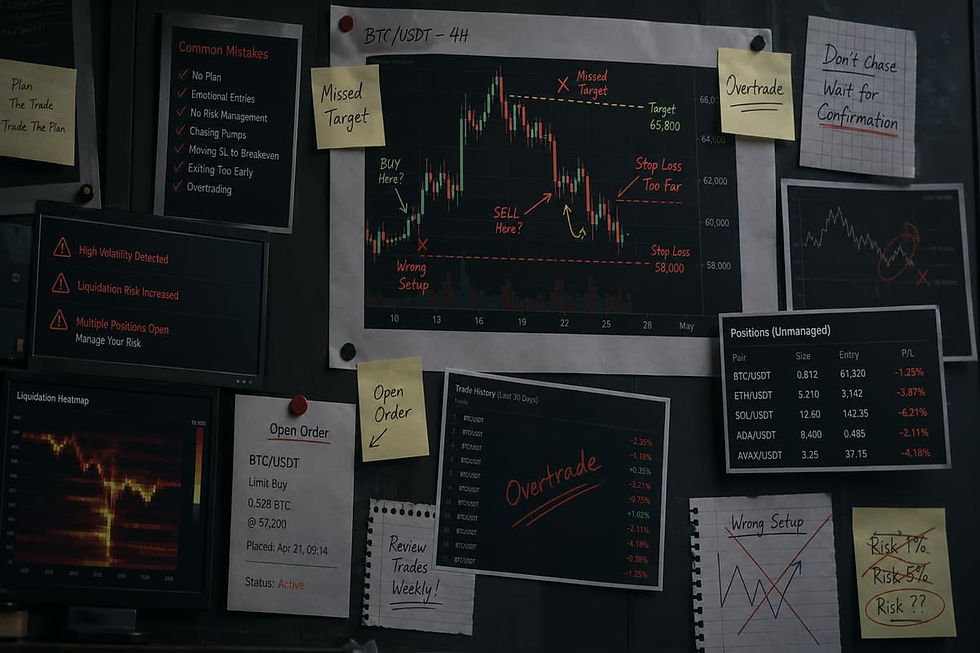
Stop loss and take profit orders can help traders follow a plan. But beginners can still make mistakes if they do not understand how each order works.
1) Thinking a Stop Loss Gives an Exact Exit Price
A stop loss does not always close the trade at the exact stop price. This is a common mistake.
A basic stop loss can trigger as a market order. After it triggers, the final price depends on the market. If the price is falling fast, the exit price may be worse than expected.
This is called slippage. It can happen during sharp moves. It can also happen when trading volume is low.
A stop loss helps control risk. It does not remove risk.
2) Setting the Stop Loss Too Close
Some beginners place the stop loss too close to the entry price. They do this because they want to keep the loss small.
This can backfire. Crypto prices often move up and down in short bursts. A tight stop may trigger during a normal price move.
The trade may close too early. Then the price may move back in the expected direction.
A stop loss should give the trade some room. It should still match the trader’s risk limit.
3) Setting the Stop Loss Too Far Away
A stop loss that is too far away can also be risky. It may allow a small mistake to become a large loss.
For example, a 25% stop loss may be too wide for many beginners. The trade may stay open for too long while the loss grows.
A wider stop should only be used with a smaller position size. Otherwise, the total loss can become too large.
4) Using Stop Loss Limit Without Knowing the Risk
A stop loss limit order gives more price control. But it has a major risk.
The order may not fill if the market drops too fast. This means the trader may still hold the asset while the price keeps falling.
Beginners should understand this before using stop loss limit orders. Price control sounds useful. But no fill can be a bigger problem during a fast market drop.
5) Forgetting to Cancel Old Orders
Old open orders can create problems. A trader may close a position manually and forget about the old stop loss order.
If that old order later triggers, it may create an unwanted trade. This can confuse beginners and lead to losses.
After closing any trade, check open orders. Cancel orders that no longer match the trade plan.
6) Not Using a Take Profit Plan
Many beginners think only about stop loss. They forget to plan where to take profit.
This can lead to emotional trading. A trader may hold too long and wait for more gains. Then the price may reverse.
A take profit order helps set a clear exit target. It can reduce greed during a strong price move.
7) Using Advanced Orders Too Early
Kraken offers advanced order tools. These may include trailing stops, stop loss limits, take profit limits, and bracket orders.
These tools can be useful. But beginners should not use them too early.
Each order type works in a different way. A small setup mistake can change the result. Beginners should first understand basic stop loss and take profit orders.
8) Ignoring Fees
Fees can affect the final result. Beginners can understand this better by reading What Are Crypto Fees and Gas Fees? A triggered order may include trading fees. These fees can reduce profit or increase loss.
Before placing any order, check the fee details. This is important for small trades too.
A trade may look profitable before fees. After fees, the result may look different.
9) Using Leverage Too Soon
Leverage can increase losses fast. It can also lead to liquidation.
Beginners should avoid margin and leverage until they fully understand the risk. Stop loss and take profit orders do not make leverage safe.
10) Treating TP and SL as a Full Strategy
Stop loss and take profit orders are tools. They are not a full trading strategy.
A trader still needs a clear plan. They should check position size, market trend, chart levels, and fees.
Learning how to use stop loss and take profit on Kraken is only one part of risk management. The bigger goal is to trade with a plan before the market tests your emotions.
Learn More:
Kraken Stop Loss and Take Profit Checklist
A checklist helps traders review the order before it is placed. It also helps reduce simple mistakes with price, size, fees, and open orders.
1) Before Placing the Trade
Before entering any trade, check the asset first. Make sure you understand what you are buying or selling.
Check whether you are trading spot, margin, or another product. Beginners should start with spot trading. Margin and leverage can increase losses fast.
Next, check the entry price. Then decide the stop loss level and take profit level. The loss should be something you can accept. The profit target should also be realistic.
Do not place a trade only because the price is moving fast; beginners should first understand cryptocurrency investing risks for new traders. A trade without a plan can lead to panic later.
This is a basic step when learning how to use stop loss and take profit on Kraken.
2) Stop Loss Checklist
A stop loss should have a clear stop price. This is the price where the order can trigger.
Check whether you are using a stop loss market order or a stop loss limit order. These are not the same.
A stop loss market order has a higher chance of filling. But the final price may be different from the stop price.
A stop loss limit order gives more price control. But it may not fill if the market moves too fast.
Also check the order size. Make sure it matches the amount you want to protect. Review fees before placing the order.
After the order is placed, check open orders. If the trade is closed another way, cancel any stop loss order that is no longer needed.
3) Take Profit Checklist
A take profit order should have a clear target price. This target should come from a plan. It should not be based only on hype or random numbers.
Check whether the target makes sense based on recent price action. If the target is too far, the order may never fill.
Also check the order amount. Make sure you are not selling more than you planned.
Review the fee and final expected result. A trade may look profitable before fees. The result can change after fees.
A take profit order can help reduce greed. But it should still match the full trade plan.
4) Kraken Pro Bracket Order Checklist
For Kraken Pro bracket orders, check the market first. Make sure the correct pair is selected.
Then check the Buy or Sell side. A wrong side can create a serious mistake.
Review the main order type, entry price, and order size. Then check the take profit price and stop loss price.
If both exit orders are used, understand how one order can cancel the other. This helps avoid unwanted open orders after one exit is triggered.
Before submitting, review all details again. This is important when learning how to use stop loss and take profit on Kraken.
Final Thoughts!
Stop loss and take profit orders can help beginners trade with a clear plan. They help define the exit before the market moves too far.
A stop loss can help reduce downside risk. A take profit order can help plan an exit when the price reaches a target. Both tools are useful for traders who want less emotion in their decisions.
Kraken also offers more advanced order types. These include stop loss limit, take profit limit, trailing stop, and bracket orders on Kraken Pro. These tools can give more control. But they also need more care.
Beginners should start with the basics first. They should understand how the order triggers. They should also know the risk of slippage and failed fills.
Learning how to use stop loss and take profit on Kraken does not make trading safe. Crypto prices can still move fast, and crypto crash volatility risks can affect whether orders fill at expected levels. Orders may not fill at the expected price. Fees can also affect the final result.
A better approach is simple. Set a plan before entering the trade. Use a reasonable position size. Avoid leverage in the beginning. Review every order before confirming.
For more practical crypto guides and risk-focused trading explainers, visit BitCoinBlog. It gives readers clear information before they use crypto tools with real funds.
FAQs About Stop Loss and Take Profit on Kraken
1) Can You Set Stop Loss on Kraken?
Yes, Kraken supports stop loss orders. Users can place them through Kraken Pro and other supported order forms.
The Kraken app may also allow stop-loss orders linked to a previous crypto purchase. The exact option can depend on the user’s region and account status.
A stop loss can help reduce loss when the market moves against a trade. Still, it does not guarantee the exact exit price.
2) Can You Set Take Profit on Kraken?
Yes, Kraken supports take profit orders. A take profit order helps a trader exit when the price reaches a selected target.
Kraken Pro also supports take profit limit orders and bracket orders. These tools give traders more ways to plan exits.
The Kraken app may also allow take-profit orders linked to a previous purchase. Users should check the options shown inside their app.
3) What Is a Kraken Bracket Order?
A Kraken bracket order lets traders set exit points with a main order. These exits can include a take profit level and a stop loss level.
For example, a trader may enter a Bitcoin trade at $60,000. The trader may set take profit at $66,000 and stop loss at $57,000.
If one exit order triggers, the other one may be cancelled. This is called One Cancels the Other, or OCO.
4) Does a Stop Loss Guarantee My Exit Price?
No, A stop loss does not guarantee the exact exit price, because stop-loss order execution risks can appear during fast or volatile markets. This is one of the biggest points beginners must understand.
A basic stop loss can trigger as a market order. After that, the final price depends on the market.
If the price falls very fast, the order may fill below the stop price. This is called slippage.
A stop loss is useful for risk planning. It is not perfect protection.
5) What Is the Difference Between Stop Loss and Stop Loss Limit on Kraken?
A stop loss order triggers when the stop price is reached. It then tries to fill as a market order.
A stop loss limit order uses two prices. One price triggers the order. The other price sets the limit for the trade.
A stop loss limit order gives more price control. But it may not fill if the market moves too fast.
This can be risky during sharp price drops. Beginners should understand this before using stop loss limit orders.
6) Can I Set Both Stop Loss and Take Profit on Kraken?
Yes, Kraken Pro supports orders that can include both take profit and stop loss. These are often used as bracket orders.
This can help traders plan both sides of a trade. The take profit sets the upside exit. The stop loss sets the downside exit.
This is useful for traders learning how to use stop loss and take profit on Kraken. It helps create a plan before the trade is live.
7) Can I Set Stop Loss and Take Profit on the Kraken App?
Yes, the Kraken app may support take-profit and stop-loss orders linked to a previous purchase.
This means the user may need to buy crypto first. Then they can choose a linked exit order if the feature is available.
The app version is simpler than Kraken Pro. It may suit beginners who do not want a full trading screen.
Still, users should review the asset, price, amount, and fee before confirming.
8) What Is a Trailing Stop on Kraken?
A trailing stop is a stop order that moves with the market. It can follow the price when the trade moves in the trader’s favor.
For example, a trader may set a 5% trailing stop. If the price rises, the stop level can move higher. If the price then falls by 5% from the recent high, the order may trigger.
Trailing stops can help protect gains. But they need care. If the trailing distance is too tight, the order may trigger too early.
9) Should Beginners Use Stop Loss and Take Profit?
Beginners can use stop loss and take profit orders as risk tools. But they should first understand how each order works.
A stop loss can help control downside risk. A take profit can help plan an exit when the price reaches a target.
These tools do not make trading safe. They should be used with small position size, clear levels, and careful review.
10) Is Stop Loss Better Than Take Profit?
Stop loss and take profit are used for different reasons. One is not better than the other.
A stop loss is used when the trade moves against the trader. A take profit is used when the trade reaches a planned target.
Many traders use both. This gives the trade a clear loss limit and a clear profit target.
11) Can a Stop Loss Fail on Kraken?
A stop loss can fail to protect the trader in some cases. The order may fill at a worse price during fast market moves.
A stop loss limit may also fail to fill if the price moves past the limit level too quickly.
This is why traders should not depend only on stop loss orders. Position size and market risk also matter.
12) Is Using Stop Loss and Take Profit Financial Advice?
No, using stop loss and take profit is not financial advice. These are order tools used in trading.
This guide is for education only. It does not give investment, legal, tax, or trading advice.
Anyone learning how to use stop loss and take profit on Kraken should review the order details first. They should also trade only with money they can afford to risk.
Read More:
Start Your Crypto Journey with Better Risk Control!

JAN MATULA
Founder of Bitcion.Blog
Graduate of Bratislava University of Economics and Business, experienced Forex and Stocks trader since 2008, early Bitcoin investor and crypto trader since 2021.
This content is for informational purposes only and should not be taken as solicitation, recommendation, endorsement or investment advice. It is crucial for you to conduct your own research and due diligence to make informed decisions, as any investment will be your sole responsibility. Please review our disclaimer and risk warning.